
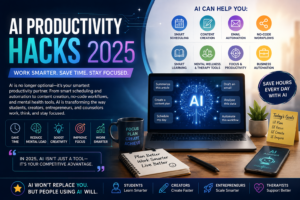
“In 2025, AI is no longer optional—it’s your smartest productivity partner.” From AI-powered personal assistants and smart scheduling to AI content creation, email automation, no-code workflows, productivity hacks, and mental health tools for therapists, artificial intelligence is transforming how students, creators, entrepreneurs, and counselors work, think, and stay focused.
Introduction
Artificial Intelligence is no longer a future concept—it’s the engine that powers our daily productivity. In 2025, AI has become more intelligent, context-aware, and seamlessly integrated into almost every digital workflow. Whether you’re a student, content creator, entrepreneur, therapist, or business owner, AI tools can save hours of repetitive work, boost creativity, and deliver lightning-fast solutions.
The digital world is changing fast. Workloads are increasing, competition is higher, and attention spans are shrinking. In this environment, productivity is no longer just about working hard—it’s about working smart. AI unlocks powerful benefits: it automates repetitive tasks, speeds up decision-making, enhances creativity, reduces mental load, improves workflow accuracy, saves time and money, offers personalized recommendations, and helps manage information overload.
In 2025, AI is not something “extra.” It has become a necessity to stay relevant, efficient, and mentally clear in a fast-moving digital landscape. This article explores practical AI productivity hacks across scheduling, content creation, email automation, no-code workflows, learning, focus, business, therapy, and creative work—so you can save hours every day, reduce stress, and upgrade your workflow like never before.
Why AI Productivity Matters in 2025
The digital world is changing fast. Workloads are increasing, competition is higher, and attention spans are shrinking. In this environment, productivity is not just about working hard—it’s about working smart.
AI unlocks powerful benefits that transform how we work and think:
- Automates repetitive tasks – Frees up hours spent on routine work
- Speeds up decision-making – Provides data-driven insights in seconds
- Enhances creativity – Generates ideas, drafts, and designs faster
- Reduces mental load – Offloads planning, organizing, and remembering
- Improves workflow accuracy – Minimizes human errors in tasks
- Saves time and money – Streamlines processes and cuts costs
- Offers personalized recommendations – Tailors suggestions to your needs
- Helps manage information overload – Filters, summarizes, and prioritizes content
In 2025, AI is not something “extra.” It has become a necessity to stay relevant, efficient, and competitive in a rapidly evolving digital landscape.

AI as Your Personal Assistant: Smart Scheduling & Automation
AI-powered personal assistants have reached a new level. They no longer just remind you of tasks—they understand priorities, detect patterns, and offer intelligent suggestions tailored to your workflow.
Top AI Scheduling Hacks
a) AI-Based Calendar Optimization
Tools like Reclaim AI, Motion, and Google Gemini automatically:
- Place tasks into free calendar slots
- Prioritize deadlines based on urgency
- Adjust schedules dynamically as priorities shift
- Reduce time conflicts between meetings and tasks
- Spread workload evenly across your day
b) Smart Reminders
AI now reminds you based on context, not just time:
- Location – Reminds you when you arrive at a certain place
- Behavior – Learns when you typically complete certain tasks
- Previous habits – Adjusts reminders based on your routine
- Project patterns – Triggers reminders when related work is underway
Example: If you usually answer emails at 10 AM, AI will remind you at the right moment—when you’re most likely to follow through.
c) Automating Routine Workflows
AI assistants can handle time-consuming tasks automatically:
- Send follow-up emails
- Schedule meetings and send invites
- Summarize discussions and meeting notes
- Draft responses to common messages
- Update project boards and task trackers
This removes 20–30% of daily low-level work, giving you back hours each week for higher-value, creative, or restorative activities.
AI-Powered Content Creation: Writing, Editing & Research
For bloggers, psychologists, educators, and digital creators, AI has become the ultimate productivity enhancer. It transforms how you create, refine, and distribute content—saving time while maintaining quality.
a) Writing Faster With AI
AI tools help generate high-quality content in minutes: Blog posts, Scripts for videos or podcasts, Social media captions, Email newsletters, Reports and summaries, Social media posts across platforms
Apps like ChatGPT 5.1, Jasper, Writesonic, and Copy.ai make writing 10× faster, letting you draft first versions quickly and focus your energy on refining and personalizing.
b) AI-Assisted Editing
AI tools don’t just write—they polish. They improve:
- Grammar – Catches errors and suggests corrections
- Tone – Adjusts formality, warmth, or professionalism
- Clarity – Simplifies complex sentences
- SEO score – Optimizes keywords and readability for search engines
- Structure – Organizes content logically
- Readability – Ensures content is easy to scan and understand
Top tools: Grammarly, Wordtune, Hemingway AI
c) AI for Research
No more spending hours searching Google or scrolling through endless results. Now AI can:
- Summarize long PDFs and research papers
- Extract important points and key findings
- Compare research findings across multiple sources
- Generate citations in your preferred format
- Analyze patterns and trends in data
Tools: ChatGPT Advanced Data Analysis, Perplexity AI, Scholar AI
d) Content Repurposing with AI
Turn one piece of content into multiple formats—maximizing reach without multiplying effort. Turn one blog into: Reels for Instagram or YouTube Shorts, Carousels for LinkedIn or Instagram, Tweets or X threads, YouTube script, Email newsletter, Infographic
AI reduces content workload by 70%, letting you create more with less time and energy.
AI for Email & Communication Automation
Emails consume too much time. In 2025, AI tools write, reply, organize, and prioritize messages automatically—turning your inbox from a time drain into a streamlined workflow.
a) AI Email Drafting
These tools write professional emails in seconds: Superhuman AI, Gmail AI Compose, Spark AI
You can choose the tone that fits your needs: Formal, Friendly, Short and concise, Detailed and comprehensive
b) AI Auto-Replies
AI replies based on previous conversations and learned patterns.
Example: If you frequently send onboarding information to new clients, AI will respond instantly with the right details—no manual copying or pasting needed.
c) Inbox Prioritization
AI filters emails into smart categories:
- Urgent – Needs immediate attention
- Important – Key messages to address soon
- Promotional – Newsletters and offers
- Low priority – Can be handled later
This intelligent sorting saves 1–2 hours daily, letting you focus on what truly matters while AI handles the rest.
AI Automation to Replace Manual Work (No Code Needed)
2025 is the era of no-code automation. Anyone—even non-tech users—can automate complex workflows without writing a single line of code.
a) Zapier AI & Make.com AI
These tools automate repetitive business processes across apps: Lead collection, Data entry, File organization, Social media posting, Form responses, CRM updates
Example workflow:
When a client fills a form, AI automatically:
Saves data to Google Sheets
Sends a welcome email
Adds contact to your WhatsApp list
Schedules a consultation
b) AI Document Automation
AI tools create professional documents instantly based on your templates: Invoices, Certificates, Reports, Contracts
No more manual formatting—just fill in the details and let AI generate the final document.
AI for Learning Faster: Micro-Learning & Personalized Study Plans
AI tools personalize learning based on your unique needs:
- Pace – Adapts to how fast or slow you learn
- Strengths – Builds on what you already know
- Weaknesses – Focuses on areas needing improvement
- Learning style – Matches visual, auditory, or kinesthetic preferences
Top AI Learning Hacks
- AI flashcards – Smart cards that adapt to your recall strength
- Auto summaries – Condenses long content into key points
- Mind maps – Visualizes connections between concepts
- Interactive quizzes – Tests understanding in real time
- Practice Q&A – Generates questions based on your progress
- Visual explanations – Turns complex ideas into diagrams and visuals
Tools: Khanmigo, Notion AI, Quizlet AI, ChatGPT Learning Mode
AI reduces study time by 40–50%, helping you learn smarter, retain more, and spend less time on repetitive review.
AI productivity hacks for Focus & Mental Clarity
Productivity isn’t only about speed—it’s also about mental clarity. AI helps you manage the hidden barriers to focus and calm:
- Distractions – Blocks interruptions before they happen
- Screen time – Tracks and limits excessive device use
- Stress – Offers real-time coping strategies
- Work overload – Prioritizes tasks to prevent burnout
Tools That Support Focus & Well-being
- Freedom AI → Blocks distracting apps and websites
- Brain.fm AI → Generates focus-enhancing music
- Calm AI Coach → Guides stress management and relaxation
- Notion AI → Creates an organized, clutter-free workspace
- Motion AI → Batches tasks for dedicated focus time
AI-Based Pomodoro Sessions
AI analyzes your focus rhythm and creates personalized work-rest intervals: 25 min work, 5 min rest, Brain breaks, Deep-work blocks
This adaptive approach helps you work with your natural energy patterns, not against them—boosting sustained attention while protecting mental health.
AI productivity hacks Tools for Business Owners & Entrepreneurs
2025 is the best time to run a business with AI assistance. From marketing to customer support to data-driven decisions, AI helps you scale efficiently without hiring a large team.
a) AI for Marketing
AI handles the heavy lifting of modern marketing:
- Keyword research – Finds high-traffic, low-competition keywords
- SEO optimization – Improves content ranking on search engines
- Social media planning – Schedules posts and suggests best times to publish
- Competitor analysis – Tracks what’s working for your competitors
- Ad optimization – Automatically adjusts bids and targeting
- Audience insights – Reveals demographics, interests, and behaviors
Tools: Surfer AI, Semrush AI, HubSpot AI, Hootsuite AI, Meta Ads AI
b) AI for Customer Support
AI chatbots handle customer inquiries 24/7 without human intervention:
- FAQs – Answers common questions instantly
- Payment inquiries – Helps with billing and refund questions
- Appointment requests – Books and reschedules meetings
- Basic counseling queries (screening only) – Provides initial triage for mental health services
- Product info – Shares details about offerings
Example tools: Intercom AI, Tidio AI, Drift AI
c) AI for Business Analytics
AI dashboards turn raw data into actionable insights:
- Traffic trends – Shows website and content performance over time
- Sales prediction – Forecasts future revenue based on patterns
- Customer behavior – Tracks how users interact with your business
- Retention rate – Measures how well you keep customers long-term
Tools: Tableau AI, Looker, Power BI AI
With AI handling data analysis, you can make faster, smarter business decisions without becoming a data scientist.
AI Tools for Therapists, Counselors & Psychologists
Since you are a mental health practitioner, these AI productivity hacks are especially useful for reducing administrative burden and improving client care.
a) Session Documentation Automation
AI generates clinical documentation quickly and accurately:
- Clinical notes – Summarizes session content
- SOAP notes – Creates structured Subjective, Objective, Assessment, Plan notes
- Treatment plans – Drafts personalized goals and interventions
Tools: Scribe AI, HealthGPT tools
b) AI-Based Psychoeducation Content
Generate professional, ready-to-use materials for clients:
- Slides – For workshops and group sessions
- Worksheets – For CBT, mindfulness, or skill-building exercises
- Handouts – For session takeaways
- Self-help guides – For between-session support
c) AI Appointment & Follow-Up Automation
AI keeps clients engaged and reduces no-shows:
- Reminders – Sends appointment notifications via SMS or email
- Homework tasks – Delivers practice exercises between sessions
- Daily check-ins – Monitors mood or progress with automated prompts
This increases client engagement and frees up time for actual counseling work.

AI productivity hacks for Health, Fitness & Wellbeing
Productivity also depends on health. You can’t sustain high performance without proper rest, nutrition, movement, and stress management—and AI is making wellness more personalized than ever.
AI Improves:
- Sleep monitoring – Tracks sleep quality and suggests improvements
- Meal planning – Creates personalized nutrition plans based on your goals
- Exercise design – Generates workout routines tailored to your fitness level
- Stress management – Offers breathing exercises, meditation, and relaxation techniques
Tools:
- Fitbit AI Coach – Guides fitness and recovery
- Apple Health AI – Integrates health data for holistic insights
- Zero AI – Optimizes fasting and sleep schedules
- MyFitnessPal AI – Tracks nutrition and suggests meals
AI-generated routines keep your energy high, ensuring you have the physical and mental stamina to stay productive without burning out.
AI productivity hacks for Project Management & Team Productivity
AI has upgraded major project management platforms, making collaboration smarter and more efficient: Trello AI, Asana AI, Notion AI, ClickUp AI, Monday.com AI
AI Helps By:
- Auto-assigning tasks – Distributes work based on team capacity and skills
- Predicting bottlenecks – Flags potential delays before they happen
- Suggesting deadlines – Recommends realistic timelines based on past performance
- Summarizing meetings – Creates quick notes and action items from discussions
- Creating project timelines – Generates visual schedules automatically
Teams complete projects 30–40% faster with AI assistance, reducing missed deadlines and improving overall workflow efficiency.
AI productivity hacks for File Management & Knowledge Organization
AI automatically organizes your digital workspace, so you spend less time searching and more time creating:
- Documents – Tags and categorizes files by type or project
- Images – Sorts photos with smart recognition
- Notes – Links related ideas and creates summaries
- Chat logs – Archives and indexes conversations for easy retrieval
- PDFs – Extracts text and makes content searchable
Tools:
- Notion AI – Organizes notes, databases, and wikis
- Evernote AI – Smart note-taking with auto-tagging
- Microsoft 365 AI Copilot – Integrates across Word, Excel, Outlook, and OneDrive
Search becomes instantaneous—no more hunting for lost files or scrolling through endless folders. Your knowledge is always at your fingertips.
AI productivity hacks for Creative Work: Design, Video & Audio
Creativity is no longer slow. AI accelerates every stage of the creative process—from concept to final product—so you can produce high-quality content in a fraction of the time.
AI for Design
Create stunning visuals without design experience:
- Canva AI – Generates designs, templates, and graphics instantly
- Adobe Firefly – Creates images and textures from text prompts
- Midjourney – Produces artistic, high-resolution images
- DALL·E 4 – Turns descriptions into detailed visuals
- Figma AI – Automates UI/UX design and prototyping
Designs that used to take hours now take minutes.
AI for Video Editing
Tools automatically handle tedious editing tasks:
- Cut clips – Removes unnecessary footage
- Add subtitles – Generates accurate captions instantly
- Remove noise – Cleans up background audio
- Create reels – Automatically剪s highlights for social media
- Add transitions – Smoothly connects scenes
Apps: Descript AI, Kapwing AI, Runway ML
AI for Audio
Perfect for your therapy YouTube content and podcasts:
- Noise removal – Eliminates background hum and distractions
- Voice enhancement – Makes your voice clearer and more professional
- Music generation – Creates royalty-free background tracks
AI lets you produce polished, professional content without needing a full production team.
AI-Powered Personal Knowledge Management (productivity hacks)
2025 PKM systems are powered by AI, transforming how you capture, organize, and retrieve your learning:
- Generate summaries – Automatically condenses long notes into key points
- Link related notes – Connects ideas across your knowledge base
- Build idea maps – Visualizes relationships between concepts
- Detect themes – Identifies patterns and recurring topics
- Create outlines – Structures content for writing or presentations
Tools:
- Obsidian AI – Privacy-focused knowledge linking with AI insights
- Notion AI – All-in-one workspace with smart organization
- Mem AI – Auto-organizes notes without manual tagging
PKM helps store your learning permanently, turning scattered notes into a structured, searchable knowledge library that grows with you over time.
Building an AI productivity hacks -Optimized Workflow (Step-by-Step)
Here’s how to create a full AI-powered productivity ecosystem:
Step 1: Identify Repetitive Tasks
Make a list of tasks you do every day or week—emails, data entry, scheduling, content drafting, etc. These are your automation candidates.
Step 2: Apply Automation
Use no-code automation tools to handle these tasks: Zapier, Make.com, Google Workspace AI, Notion AI
Step 3: Use AI for Planning
Let smart calendars schedule your work automatically: Reclaim AI, Motion, Google Gemini
Step 4: Use AI for Writing & Communication
Draft emails, reports, blogs, and scripts with AI:
- ChatGPT, Jasper, Writesonic
- Grammarly, Wordtune
- Superhuman AI, Gmail AI Compose
Step 5: Use AI for Focus
Install tools that protect your attention: Distraction blockers (Freedom AI), Brain-music apps (Brain.fm AI), Pomodoro tools (Motion AI)
Step 6: Integrate Organization Tools
Keep everything structured and searchable:
- Notion AI – Notes, databases, wikis
- Evernote AI – Smart note-taking
- File-auto-taggers – Automatic file organization
Step 7: Review Weekly
AI will give you productivity insights weekly: Track time spent on tasks, Identify bottlenecks, Suggest improvements.
Follow these steps, and you’ll build a seamless AI-powered workflow that saves hours, reduces stress, and elevates your productivity consistently.
Ethical Use of AI (A Must for 2025)
AI is powerful, but it must be used responsibly—especially in fields like mental health, counseling, and content creation where trust and privacy matter.
Follow these ethical guidelines:
- Always verify AI-generated content – Double-check facts, citations, and accuracy before publishing or sharing
- Avoid sharing confidential client data – Never input sensitive personal or clinical information into AI tools
- Use AI only as a helper, not a replacement – AI supports your work; it does not replace human judgment, creativity, or care
- Maintain human empathy in counseling – Therapeutic relationships require genuine connection that AI cannot replicate
- Follow professional guidelines and privacy laws – Adhere to ethical codes, HIPAA, GDPR, and other relevant regulations in your field
Using AI ethically protects your clients, your reputation, and the integrity of your practice.
Future of AI productivity hacks : What to Expect After 2025
AI will soon:
- Anticipate needs even before you ask – Proactively suggest actions based on your habits
- Predict work patterns – Forecast busy periods and optimize your schedule in advance
- Offer personalized emotional support – Provide tailored wellness and stress-management guidance
- Automate entire workflows end-to-end – Handle complex multi-step processes without manual intervention
- Become fully voice-integrated – Control tools and workflows entirely through voice commands
AI is becoming the most powerful productivity partner humans have ever had—transforming not just how we work, but how we think, create, and thrive in a digital world.
Conclusion
2025 is the year where AI becomes your smartest partner in life, work, and creativity. Whether you want to write faster, organize your workload, manage clients, create content, or boost mental clarity—AI tools can transform your productivity.
Implement these hacks, and you will save hours every day, reduce stress, and upgrade your workflow like never before.
Frequently Asked Questions (FAQ)
1. What is AI productivity hacks and why does it matter in 2025?
AI productivity hacks refers to using artificial intelligence tools to automate tasks, speed up workflows, and enhance creativity. In 2025, AI has become essential for staying competitive, reducing mental load, and saving hours of repetitive work across education, business, content creation, and mental health practice.
2. Which AI tools are best for writers, bloggers, and content creators?
Top AI productivity hacks tools for content creation include ChatGPT 5.1, Jasper, Writesonic, and Copy.ai for writing; Grammarly, Wordtune, and Hemingway AI for editing; and Perplexity AI and Scholar AI for research. These tools make writing 10× faster and reduce content workload by up to 70% through repurposing.
3. How can AI help therapists and counselors save time?
AI productivity hacks automates session documentation (clinical notes, SOAP notes, treatment plans), generates psychoeducation materials (slides, worksheets, handouts), and handles appointment reminders and follow-ups. Tools like Scribe AI and HealthGPT are designed specifically for mental health professionals.
4. Is AI safe to use for handling client data in counseling?
No. You should never share confidential client data with AI productivity hacks tools. Always follow privacy laws (HIPAA, GDPR) and professional ethical guidelines. Use AI only as a helper for non-sensitive tasks like drafting, organizing, or generating general content.
5. Do I need technical skills to use AI automation tools?
No. 2025 is the era of no-code automation. Tools like Zapier, Make.com, and Notion AI allow anyone—even non-tech users—to automate workflows like lead collection, data entry, and email responses without writing code.
6. How much time can AI actually save me?
AI productivity hacks can save 20–30% of daily low-level work through automation, reduce study time by 40–50% with personalized learning, cut content workload by 70% through repurposing, and save 1–2 hours daily just through email prioritization and automation.
7. Will AI replace therapists, counselors, or human creativity?
No. productivity hacks is a helper, not a replacement. It supports documentation, organization, and content drafting, but it cannot replace human empathy, clinical judgment, therapeutic relationships, or genuine creativity. Always maintain human oversight and ethical responsibility in your work.
Reference
-
Google AI
https://ai.google -
Microsoft Copilot
https://copilot.microsoft.com -
Zapier AI Automation
https://zapier.com